
There is no single minimum size for a QR code. For most print jobs, 2.5 cm (1 inch) wide is a sensible starting point, and a very short link can go smaller if it will be scanned up close. The real limit depends on how much data the code holds and how far away people will scan it.
Here is how to work out the right size for your code, using real numbers.
Quick size guide by scanning distance
A common rule of thumb is that a QR code should be about one tenth of the distance it is scanned from. Use it as a starting point, then test a printed sample.
| Where it is used | Typical scanning distance | Suggested width |
|---|---|---|
| Business card or label | 25 cm (10 in) | 2.5 cm (1 in) |
| Restaurant table tent | 30 cm (12 in) | 3 cm (1.2 in) |
| Flyer or shop counter sign | 50 cm (20 in) | 5 cm (2 in) |
| Poster on a wall | 1.5 m (5 ft) | 15 cm (6 in) |
| Shop window | 3 m (10 ft) | 30 cm (12 in) |
Why more data needs a bigger code
A QR code is a grid of small squares called modules. The more data you put in, the more modules it needs. If the printed width stays the same, each module gets smaller and harder for a phone camera to read.
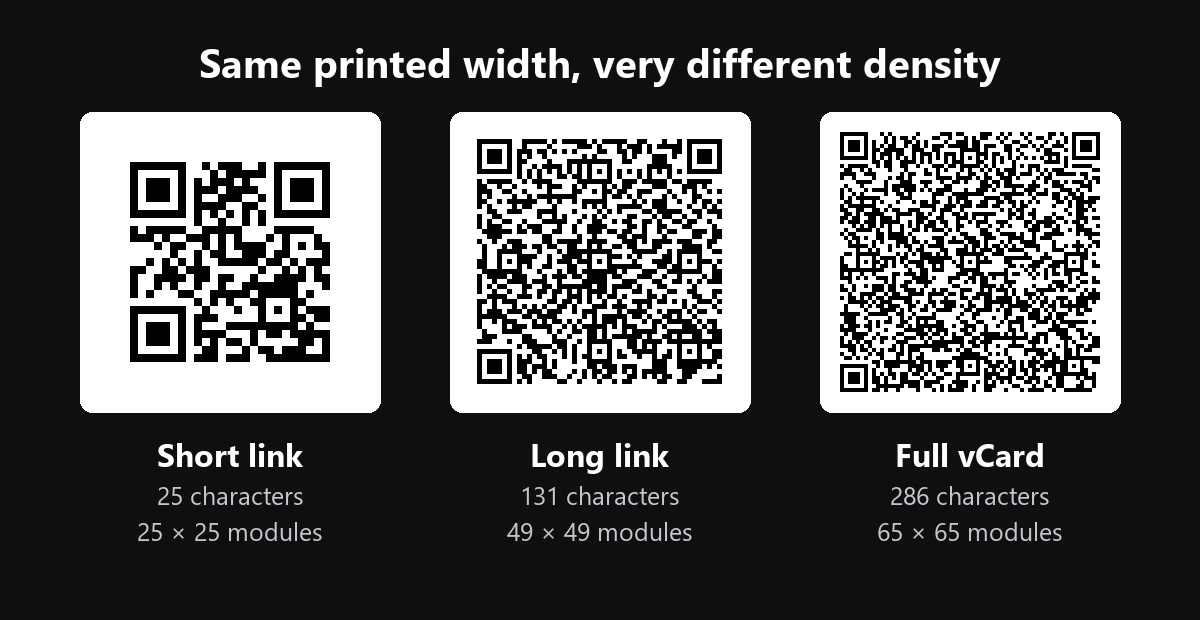
We generated three example codes with the same error correction setting (level M) to show the difference:
| Content | Characters | Grid size | Minimum width at 0.5 mm per module |
|---|---|---|---|
| Short link | 25 | 25 × 25 | 16.5 mm |
| Long link with tracking parameters | 131 | 49 × 49 | 28.5 mm |
| vCard with full contact details | 286 | 65 × 65 | 36.5 mm |
The widths include the blank margin around the code. They use 0.5 mm per module, a cautious figure for phone scanning, and they are minimums for scanning up close. Your own result depends on the printer, the material and the phones people use, so treat them as a floor rather than a target.
How to calculate the minimum width
You can estimate a minimum width for any code in three steps:
- Count the modules along one side of the code.
- Add 8 for the margin, because the QR standard calls for a clear zone 4 modules wide on each side.
- Multiply by your module size. For example, a 49 × 49 code gives (49 + 8) × 0.5 mm = 28.5 mm.
If the result is bigger than your available space, reduce the data in the code rather than shrinking it further.
How to make a QR code smaller
- Shorten the link. This usually makes the biggest difference. In the table above, the short link needs 40% less width than the long one. A trackable QR code does this automatically, because the code holds a short link instead of your full address.
- Remove unnecessary fields. On a vCard QR code, share your name, phone, email and website, and leave out anything people do not need.
- Avoid high error correction unless you need it. Higher levels help a damaged code stay readable, but add modules. Our short link grows from 25 × 25 at level M to 33 × 33 at level H. Level H is mainly useful when a logo covers part of the code.
- Print in high contrast. Dark modules on a light background are the safest choice, especially at small sizes.
When small codes fail
If a small code will not scan, check these common causes:
- No clear margin. Text or artwork too close to the code can stop it from being detected.
- Blurry printing. Tiny modules can bleed together, especially on textured paper or fabric. Use SVG or another vector format so the code stays sharp at any size.
- Curved or shiny surfaces. Bottles, cans and glossy finishes can distort the code or cause glare, so allow extra size.
- Low light. A code in a dim restaurant or a corridor needs more margin for error than one on a bright counter.
Always test the final printed item, not just the file on your screen. Try more than one phone, including an older one, from the distance people will actually use.
Frequently asked questions
What is the smallest size for a QR code?
There is no official smallest size. A short link can work at around 1.5 to 2 cm when scanned up close, but 2.5 cm (1 inch) is a safer minimum for most printed items.
What size should a QR code be on a business card?
Start at around 2.5 cm (1 inch). A vCard with many details is denser, so it may need 3.5 cm or more. Removing optional fields lets you keep it smaller.
Is there a maximum size for a QR code?
There is no practical upper limit on printed size. The largest standard grid is 177 × 177 modules, but that limits the amount of data, not how big you can print. Large codes on billboards and buildings are scanned from far away.
Does a bigger QR code scan better?
Up to a point. A bigger code is easier to read from a distance, but a person standing very close may not fit a huge code in the camera frame. Match the size to where people will stand.
Ready to make one? Create a free code with our QR code generator, or use the QR code menu generator for your restaurant.